Archive for the ‘ technology ’ Category

McTube Pro for YouTube removes caching

20130514-144056.jpg
Today Software Line Inc pushed out an update to my favorite YouTube app for the iPhone.

This update is apparently removing the coveted caching feature at the request is Apple and YouTube. This is one of the two reasons I use McTube as my primary YouTube client.

As for now, I’m not downloading this update. This will become more and more annoying as other apps get updated since I won’t be able to click “Update All”.

Hopefully, in the next update they’ll add it back.

Mailbox: iOS app review

20130325-191138.jpg

After waiting weeks to get into the exclusive club that is Mailbox I am unable to continue using the app.

Where Mailbox excels:
The single action UI is brilliant and innovative. It allows me to do the two or three most common actions with a single swipe. These include Archive and Delete but also a Postpone and Add to List. More on the latter two later.

One click is one click and only one click. That is all Mailbox saved you, is one click. But it’s one click per email. This is the primary reason why I like Mailbox and wanted it to succeed as my mail client of choice.

Where Mailbox is OK:
The workflow that Mailbox preaches is one that I am not convinced is the best way to manage email. The incremental features that Mailbox offers are all about postponing action. “No time now? Do it later by either Postponing it or adding it to a ‘needs action’ list. Don’t feel like it now? Do the same.”

This paradigm may sound familiar, it’s very similar to procrastination. I know it’s not the same since the intention is the user is being proactive about postponing the action as opposed to simply letting the action be delayed.

It is a slippery slope in my book and one that will end up not actually changing people’s bad email organization habits. It will just mean more gets pushed downstream to a later time.

Where Mailbox fails:
Search. I use search within my email management a lot. One of the examples of how it is failing is this; I often send myself files or links or copies of stuff I want to make sure I have record of. In this case it was PDF versions of my tax documents. I sent them from my work email to my personal email so Gmail recognizes it as being sent from me. The subject of this email is “Tax documents”. When I search for that string or any sub part of that string it find other emails but not that email.

I’ve given it a couple days to possibly complete the indexing process but that doesn’t seem to help.

After this trial I will go back to using Google’s Gmail app even though it too has its flaws. The Gmail app has a beautiful UI, better than Mailbox’s and has perfect synchronization with Gmail. Things I would like to have in the Gmail app are the single-action interaction a la Mailbox, click on phone numbers to call, click on contact to go into the Google Contact manager (which doesn’t exist).

That’s my opinion. I am a person though who has always kept a tidy inbox and don’t get overwhelmed by email so perhaps I am not the targets ruler for Mailbox.

I wish them luck. Thanks for reading.

Low-cost web hosts: they’re all fine, until they’re not

20130226-202644.jpg
What I have learned over the last month or so, through first hand experience and secondary research is that all low-cost web hosts are essentially the same.

The product they offer is adequate for small time players like me. The performance is good to great at first and seems to deteriorate over time, whether it be months or years. They all are reliable … Until they aren’t.

GoDaddy has been my web host for several years and I have found them to be following the stereotypical life cycle of a low-cost web host. GoDaddy has recently been giving my WordPress site a lot of trouble the past month and the past few days have had significant downtime, again only for my WordPress site. The other pages and files performed well throughout.

I seriously considered switching to one of the three WordPress recommended we hosts, but from the reviews they all seem to be the same.

What have I really learned? If you are paying less than $10 a month for web hosting you are bound to run into similar issues at some point.

It seems that you would need to pay at least $15 a month from a company like LiquidWeb if you want more reliable, higher performance web hosting.

Thanks for reading.

First-world problem: The iPhone home screen

Since upgrading to the iPhone 5, the added row of applications has almost been more of a curse than a blessing.

With my iPhone 3G (AT&T), which I kept for almost three years waiting for a Verizon iPhone, then finally an iPhone 4 (Verizon), for a little over two years, I had nearly five years of refining and curating the exact app and folder position and content.

Now with the iPhone 5 all that refinement and curating has largely gone out the window.

I have found that in organizing my iPhone home screen I have two primary goals or guidelines:

  1. I like to group my similar apps together. Work apps go together, as do music, photo, social, and so on.
  2. I also don’t want to put everything on my home screen in folders as that removes the quick access benefits of having them on the home screen.

With those goals in mind, finding the right set of 20, or so, apps is no easy feat. We all have application usage tiers. These tiers form and function very similarly to one’s circle of friends. The first circle of friends are those closest to you, whom you content regularly, and about whom you care a significant amount. As you progress through the circle of friends, the friends in subsequent circles become less close to you, you contact them less frequently, and you care about them less and less.

Application Tiers exist in the same fashion. With both friends and apps, the first tier or circle is not defined by a hard and fast number. I do not have on any given day exactly 20 (no more, no less) apps in my first tier. My first tier of apps is more likely to be closer to 12 or 15 apps leaving a more than a few spots unfilled on the new iPhone 5 home screen.

You might be thinking, “why not just pull from the second tier of apps to fill the spaces?” That is the natural progression of logic in this case, however my second tier of apps is larger than just three or four apps. That being the case, I would then need to create a sub-division of my application tiers in order to fill up the home screen of the iPhone 5. Not only is this not necessarily easy to accomplish it also has a high potential of infringing on one or both of my goals/guidelines.

And so continues the journey or iPhone 5 home screen perfection. Too many spots to either force me to use folders, like I did on my previous iPhones, and too few spots to fit all of my tier one and two applications.

This whole effort would be simplified if Apple would allow usage stats to be exported. This way I could see how frequently I open the applications on my phone allowing me to use actual statistics to help me refine my home screen. To my knowledge, as of the publishing of this post, no such app exists for a non-jailbroken iPhone.

Another aspect of this is that I desire multiple apps to fill the role of one. The best examples of this are the Weather and Accuweather apps, since neither are right I take the pessimistic Weather app and the optimistic Accuweather app and average them out. Another example is Waze and Google Maps. Google Maps, of course, owns the way-point and ideal driving directions but Waze has better, community driven, traffic and hazard reporting.

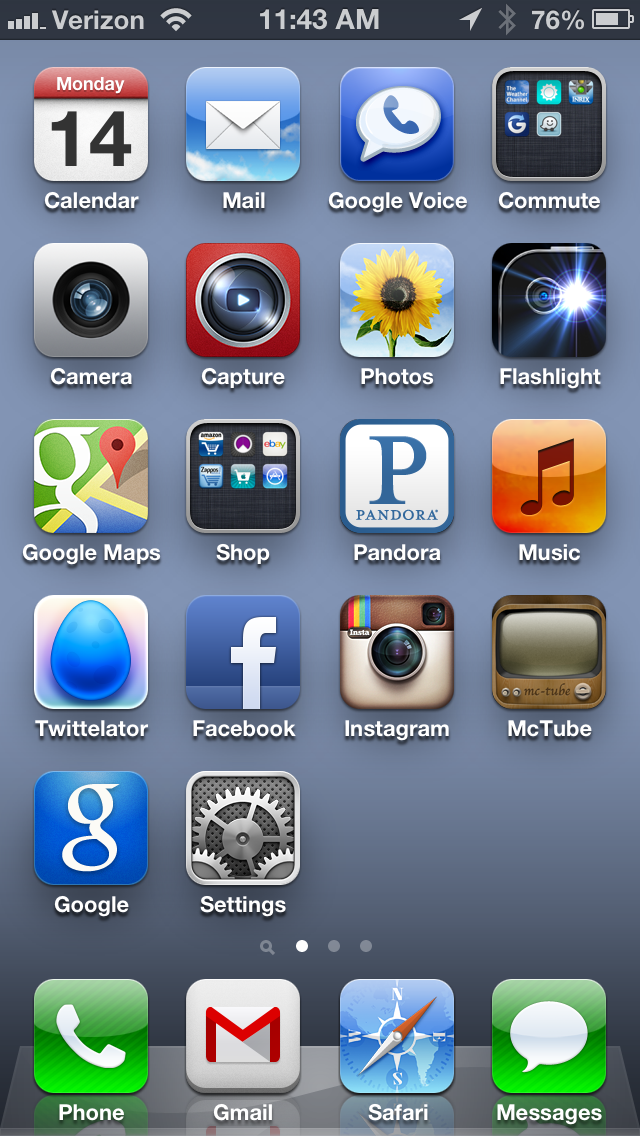
As to not bore you further, here is how my home screen stand as of January 14, 2013. I am sure this will change in the coming days or even hours. I am currently questioning the need to have Google Voice and Google Maps in their current position.

iphone-home-screen

Open Discussion: The Definition of Agile

This morning I sent an email to my development and QA team leads. It was a response to a discussion we had all had a couple weeks ago about the definition of Agile Software Development and whether my plan for next year (2013) was more Agile than our current approach. Below is the bulk of the email.

——

The phrase I’d like to call out in particular, from the wikipedia definition, is “a time-boxed iterative approach”.

From Wikipedia
Agile software development is a group of software development methods based on iterative and incremental development, where requirements and solutions evolve through collaboration between self-organizing, cross-functional teams. It promotes adaptive planning, evolutionary development and delivery, a time-boxed iterative approach, and encourages rapid and flexible response to change. It is a conceptual framework that promotes foreseen interactions throughout the development cycle. The Agile Manifesto[1] introduced the term in 2001.

My personal definition of Agile Software Development, as it applies to my current position, involves the following steps:

  1. Discover and define a problem or opportunity
  2. Define and design a UI for the minimum set of features to address the issue from #1
  3. Determine the amount of time worth spending on implementing #2 (At this point, if effort greatly outweighs value, either the problem/op or solution need to be reconsidered.)
  4. Code-design and implement with the intention to produce simple, high quality, working code in as little time as possible
  5. Release and monitor
  6. React and iterate

Between each step there are, of course, discussions held, adjustments made, and iterations on what is the “current truth”.

I would like to remind us all of our goal to be agile and let us cross detail-bridges as they come while planning for future known-bridges.

——

In Conclusion: Being Agile is more fun and rewarding than being NOT Agile.

37 Signals

“Scope down. It’s better to make half a product than a half-assed product.”
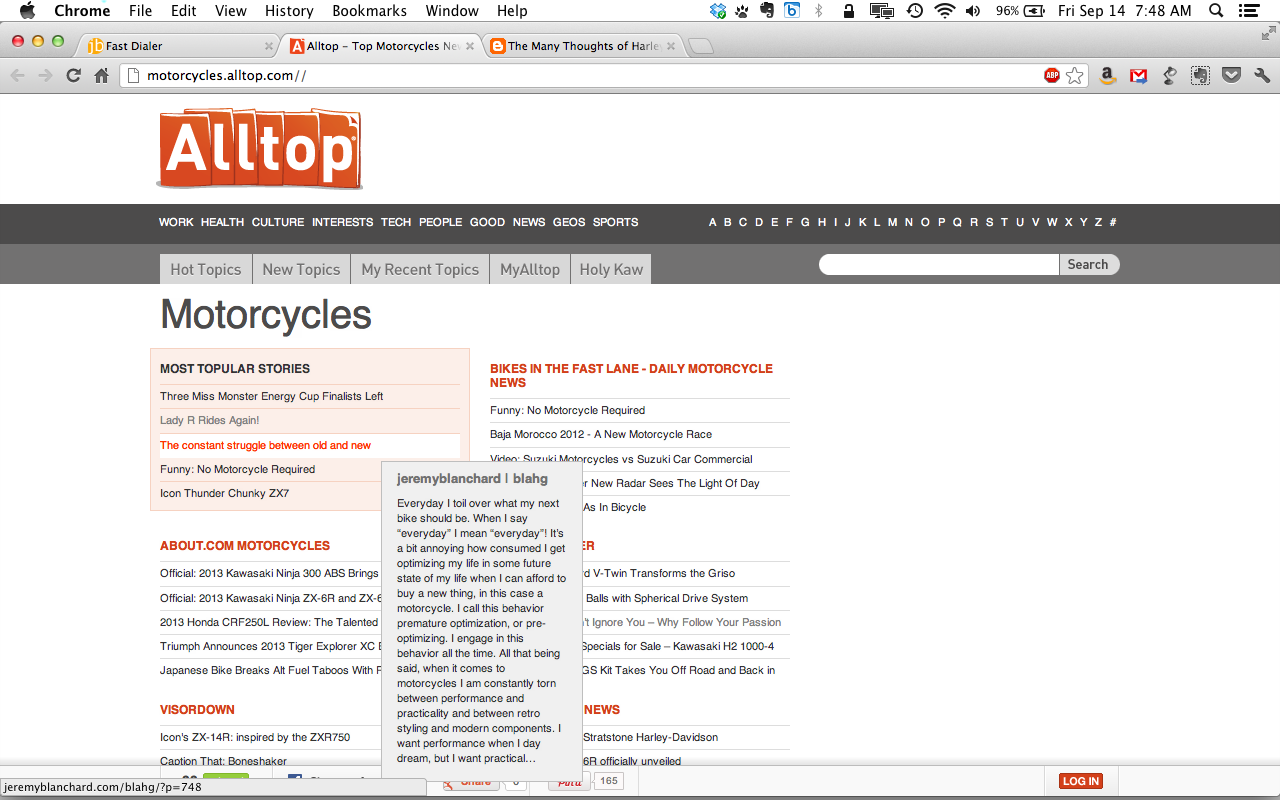
The day my post was a “Most Topular Story”

That's my post right there

That’s my post right there

The timing must have been just right.

I go to the motorcycle.alltop.com website more of less every day, so imaging my surprise when my post was one of the top stories of the morning.

Side project to replace my dependancy on Fast Dial Firefox Add-on

For years I have been using and depending on a certain Firefox Add-on. This add-on has been very useful since I am a visual thinker. It is called Fast Dial and is created by UserLogos.org.

Since I can remember this add-on has ‘broken’ with each major Firefox upgrade. This wasn’t too much of a problem until Mozilla recently switched to a rapid deployment, similar to Google Chrome. Since then, this add-on has been ‘breaking’ almost every month or two, requiring me to go find the ‘unapproved’ beta, download, and install it.

Well yesterday, when I upgraded to Firefox 8 and Fast Dial broke, I was fed up. So I created my own html page to mimic the functionality of Fast Dial. Granted it doesn’t have all of the fancy resizing that Fast Dial has and if I want to change something I need to edit the html page and re-upload it, but… it won’t break, I can access it on any browser on any computer any where in the world where there is internet. I can even access it on my iPhone, though I haven’t tried it yet.

I call it FastDialer. Feel free to take the code and copy it, make it your own. It’s only when I make an interface for updating the ‘dials’ that I will start packaging it and posting it as something. The images, however, are Helveticons (I love ‘em) which are not free. My company has the complete license.

For now, it is simply my personal launch page that I use on my work computer.

screen-shot-2011-11-10-at-7-50-10-pm